- 01Decide what the monthly top-up will cover
- 02Ways to top up Mobile Suica
- 03Top-up limits and how to build 15,000 yen
- 04Steps for the monthly top-up
- 05Sorting out where points may decrease
- 06What tends to overlap in the month you switch
- 07When the balance is left over or runs short
- 08Can you get a refund?
- 09How it compares with other payment methods
- 10Who it suits and who it does not
- 11Common mistakes
- 12Check before you start
- 13FAQ
- 14Official sources I referred to
- 15Summary
Good morning, this is まさきん.
In our household, we moved small payments at convenience stores and bicycle parking from a credit card to a monthly top-up of Mobile Suica. Small payments happen so often that they are hard to track in a household ledger. Here I sort out the two points that mattered when switching: the points you may earn less of, and the things that tend to overlap in the month you switch.
※This article reflects information at the time of publication. Please check the official sites for the latest conditions.
- In our household, we switched small convenience store and bicycle parking payments to a 15,000 yen Mobile Suica top-up at the start of each month
- Officially, one top-up is up to 10,000 yen, and the Suica balance is capped at 20,000 yen
- So 15,000 yen means splitting it into two top-ups, or planning around your remaining balance
- A Rakuten Card top-up via Rakuten Pay is described as 0.5% back, which may be lower than the rate of the card you paid with before
- In the month you switch, the old card bill and the new top-up tend to land in the same month
- It is safer to assume that money you have topped up cannot be taken back
Decide what the monthly top-up will cover
The first thing I decided was what to pay with Suica. In our household, I limited it to small payments at convenience stores and bicycle parking.
Each small payment is tiny, but the monthly total can be surprisingly large. With a credit card, your statement fills up with small lines. With Suica, the amount you load at the start of the month becomes the ceiling.
In other words, you hand out the monthly allowance first. It may feel close to envelope budgeting. From an FP point of view, it puts a cap on the small-payment part of variable costs.
That said, whether a bicycle parking facility accepts Suica depends on the facility. I could not confirm it in one place from official information. Checking the operator or municipality notice beforehand is the safe way.
Ways to top up Mobile Suica
Mobile Suica has several top-up methods. Here are the ones described on the official JR East page.
| Method | Key point in the official description |
|---|---|
| Credit card | Pay with your registered card to top up |
| Auto-charge | For View Card members only. Tops up automatically when the balance falls below a set amount at the gate |
| Cash | Supported convenience stores, some station machines, Seven Bank ATMs, etc. |
| JRE POINT | Top up directly from the app menu |
| Other apps | Top up via linked apps such as Rakuten Pay, au PAY, d payment (for Android, etc.) |
The method you use changes the limits and the point rules. You need to check the conditions for your own route on the official pages.
The official page also mentions an available time window of 4:00 to 2:00 the next day. Trying to top up late at night on the first of the month and finding it is out of hours is a failure worth avoiding.
Top-up limits and how to build 15,000 yen
Three numbers are worth keeping in mind.
| Item | Official description |
|---|---|
| One top-up | Up to 10,000 yen, in 500 yen units |
| Suica balance cap | 20,000 yen |
| Rakuten Pay on iPhone | Up to 10,000 yen per top-up, by card or points |
Under the JR East terms, the amount per top-up depends on each app operator. So you should check the limit of the app you use.
If you load 15,000 yen at the start of the month, it will not fit in one go. You split it, for example 10,000 yen and 5,000 yen.
The balance cap matters too. You cannot add money beyond 20,000 yen. If 6,000 yen is left from last month, 15,000 yen will not go in as is.
Honestly, I felt this carry-over balance is the biggest pitfall. Deciding the top-up amount after looking at your balance may be safer.
Steps for the monthly top-up
Here is the flow I would follow at the start of each month.
- Check your current balance in the Mobile Suica app
- Calculate the maximum you can add: 20,000 yen minus the balance
- Work out what is missing from your monthly allowance (15,000 yen in our household)
- If it exceeds 10,000 yen per top-up, split it into two
- Record the balance after topping up in a memo or ledger
- Decide in advance what to do when the money runs out mid-month
The sixth step saves you from hesitating later. For example, a loose rule such as going back to another payment method once you exceed the allowance is one option.
Sorting out where points may decrease
When switching, points are the main issue. I find it easier to look at each route separately rather than go by feel.
On the official Rakuten Pay page, a Rakuten Card top-up is described as “0.5% back, always”. The Android description says 1 point per 200 yen. Points are granted from the day after the top-up.
For example, for a 15,000 yen top-up, 0.5% is equivalent to 75 points.
| Route | Points (per official descriptions) |
|---|---|
| Rakuten Card via Rakuten Pay | 0.5% back (1 point per 200 yen) |
| Top-up with Rakuten Points | No Rakuten Points are granted |
| Paying with Suica itself | Described as not earning points on the Rakuten Pay page |
| View Card top-up | JR East mentions 1.5% back |
The Rakuten Pay page also says the rewards may be changed or ended without notice. So please check the numbers on the official page when you start.
What you compare against is the rate when paying directly with your original card. If that card gave 1%, then 15,000 yen would be about 150 yen. At 0.5% it is about 75 yen, so the gap is about 75 yen per month.
The amount may look small. Over a year, though, it adds up. The question is how to weigh this gap against the value of easier household management.
On the View Card’s 1.5%, another JR East page attaches a note on conditions. If you plan to use it, check the auto-charge conditions on the official site.
What tends to overlap in the month you switch
Now for the overlaps that tend to happen in the switching month. Since everyone’s situation differs, I list only the viewpoints as general points.
In the switching month, the old card bill and the new top-up tend to appear together in your household budget. Spending for that month may look temporarily large.
Things that tend to overlap include the following.
- Old card bills: depending on closing and payment dates, earlier small payments may be debited in the following month or later
- The new top-up: goes out first as the monthly allowance, close to cash
- Monthly or pass-type payments: if you pay for monthly bicycle parking by card, check how it is handled separately
- Auto-charge settings: leaving auto-charge on while also topping up manually can cause top-ups to stack
- Last month’s balance: leftover money carries over to the next month
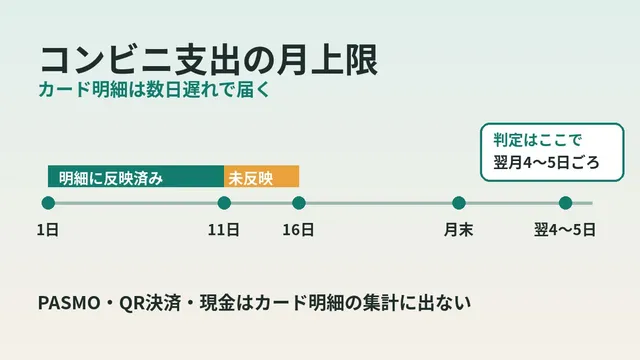
I also touched on billing gaps in an article on the convenience store monthly cap and card statement delay. In the month you switch, writing the statement dates on a calendar may help avoid confusion.
When the balance is left over or runs short
Even if you load 15,000 yen, you may not use it all. The leftover carries over to the next month.
In a month with a large leftover, you can reduce next month’s top-up. In a short month, you pay the excess by another method.
If shortfalls continue, it may be a sign to review the allowance. After a few months of data, adjusting the monthly amount seems fine.
In your ledger, how you record the top-up changes how things look. It is a choice between “expense” and “fund transfer”. Recording it as an expense makes the real usage harder to see. It is good to accept that in advance.
Clicking this opens the Rakuten login page. Once you log in, you’ll see the campaign details.
Can you get a refund?
Whether you can get topped-up money back is worth checking.
The JR East top-up page says that money once topped up cannot be refunded, except when you cancel your membership. On the other hand, the terms of use contain a clause allowing you to request a refund of the SF balance when it is no longer needed.
According to the terms, you can request it from the app or the member menu. In principle, it is refunded to a domestic account in your own name. Requesting a refund of all Suica is treated as a request to withdraw your membership.
The body of the terms did not state the fee deducted for a balance refund. So it is safer not to plan on the assumption that you can get it back. Using up the leftover next month is probably the realistic approach.
How it compares with other payment methods
Here is a comparison of small-payment methods from a household-sorting viewpoint. It is not about numbers but about how the household looks.
| Viewpoint | Direct card payment | Monthly Mobile Suica top-up |
|---|---|---|
| When spending is fixed | On the day of use (billed later) | On the day of the top-up |
| Brake on overspending | You judge from the statement | The top-up amount is a natural ceiling |
| Points | Depends on the card rate | Depends on the top-up route rate |
| Balance management | Not needed | Needed (20,000 yen cap) |
| Where to use | Shops that accept cards | Shops and facilities that accept Suica |
It is less about which is right and more about different purposes. If you want to maximize points, paying directly may be better in some cases. If you want a ceiling on spending, the monthly top-up may suit you.
Who it suits and who it does not
It may suit people like these.
- You make many small payments and cannot keep up in a ledger
- Your places are mostly fixed, such as convenience stores and bicycle parking
- You want to decide a monthly cap first
- You prioritize preventing overspending over points
It may not suit people like these.
- You want to put the point rate first
- Your monthly spending swings a lot and an allowance is hard to set
- Checking the balance and topping up at the start of the month feels like a burden
- Your usual shops or bicycle parking do not accept Suica
Common mistakes
Here are the points where people often stumble.
- Topping up without checking last month’s balance and failing at the 20,000 yen cap
- Forgetting the 10,000 yen limit and trying to load 15,000 yen at once
- Setting up both auto-charge and manual top-ups so that they stack
- Missing the old card bill in the switching month, so spending appears twice
- Finding out right before use that a bicycle parking facility does not accept Suica
- Assuming a refund is possible and leaving a large leftover
Check before you start
- What is the per-top-up limit of the app you use
- How much balance is left at the start of the month
- Do your shops and bicycle parking accept Suica
- How does the rate of your top-up route compare with your original card
- When will the old card bill be debited
- Are any overlapping settings, such as auto-charge, still on
FAQ
Q. Can I load 15,000 yen at once at the start of the month?
JR East states that one top-up is up to 10,000 yen. So 15,000 yen means splitting it into two. The limit may differ by app, so check the guide of the app you use.
Q. How much can Suica hold?
The Suica balance cap is stated as 20,000 yen. You cannot add money beyond that. If some balance is left, the limit is that amount minus the balance.
Q. Do I earn points when topping up with Rakuten Card?
The Rakuten Pay page describes Rakuten Card top-ups as 0.5% back. Points are granted from the day after. It also says changes or an end may happen without notice, so check the latest information.
Q. Do I earn points when topping up with Rakuten Points?
The Rakuten Pay page says no Rakuten Points are granted for top-ups made with points. Only regular points can be used. Limited-time points cannot be used for top-ups.
Q. Can I get a refund of topped-up money?
The JR East top-up page says it cannot be refunded except when you cancel your membership. The terms also contain a refund clause, but I could not confirm the fee amount in the text. It is safer to plan on the assumption that you cannot get it back.
Q. What should I watch for in the switching month?
The old card bill and the new top-up tend to land in the same month. Check the closing and payment dates, and keep the debit dates on a calendar to avoid confusion.
Q. Can I use Suica at bicycle parking?
I think it depends on the facility. I could not confirm it in one place from official information, so please check the operator or municipality notice. Monthly bicycle parking may use a different payment method.
Q. Should I use auto-charge?
According to JR East, auto-charge is for View Card members only. If you want to manage with a monthly allowance, automatic top-ups may not fit well. Choose according to your purpose.
Official sources I referred to
- JR East Mobile Suica top-up
- JR East Terms of Use for Suica on Mobile Devices (PDF)
- JR East View Card features (Suica top-up rewards)
- JR East View Card: how points are earned
- JR East Suica balance refund (card type)
- Rakuten Pay: Suica in Rakuten Pay
- Rakuten Pay: Top up Mobile Suica on iPhone
- JR East: Rakuten Pay and Mobile Suica link (2023 notice)
Summary
Putting small convenience store and bicycle parking payments into a monthly top-up gives your spending a ceiling. In return, you accept the balance cap and the point difference.
In our household, we switched after sorting out these points. Numbers may change, so why not check the official pages before you start?
Starting fixed-cost review from big items such as mobile fees is also an option. I hope to tidy things up little by little, together with the small-payment sorting.
Clicking this opens the Rakuten login page. Once you log in, you’ll see the campaign details.
This article contains affiliate advertising. If you sign up for a product or service through a link on this site, we may receive compensation from the partner company. The site operator is also an employee of Rakuten Group and may receive compensation through an employee referral program. The content and opinions here are based on the operator’s own experience and research regardless of any advertising relationship, but please read with the above in mind. See the Disclaimer & Affiliate Disclosure for details. Disclaimer & Affiliate Disclosure
This article includes machine-translated content. Please check the official Rakuten Mobile multilingual page for exact terms.
If you have concerns about Rakuten Mobile coverage or signal quality, you can consult through the official signal improvement request form .